Wednesday, August 4, 2010

SSRS Fix for FireFox/Chrome Report Size

If you have ever used Chrome or FireFox with SSRS, you know the report window can show up very small. This is due to the way that SSRS implements the IFRAME.

A quick fix for this is to add the following entry to the ReportingServices.css file.
.DocMapAndReportFrame
{
min-height: 800px;
min-width: 800px;
}
You can usually find the ReportingServices.css file at: C:\Program Files\Microsoft SQL Server\MSSQL.3\Reporting Services\ReportManager\Styles, however your location may be different depending on your installation.

peace

Friday, July 23, 2010

Using Maximum Insert Commit Size with FAST LOAD on the OLE DB Connector, and a Warning

I have been working on some new ETL recently, which of course has me optimizing the ETL. One of the things that I look at while optimizing is the Maximum Insert Commit Size (MICS) one the OLEDB connector when using the Table – FAST LOAD option.

This setting controls how many records are sent and committed to a table at a time. For example, if you have a 12,000 record source, and you set MICS to 5,000, you will have 3 bulk insert statements sent to the server: two with 5,000 records and 1 with 2,000 records.

The beauty of doing this is that it helps keep the transaction log small if you use simple logging. (On staging databases, I routinely use simple logging since there is no need to have full logging). It can also increase performance since the server is dealing with smaller chunks of data at one time.

But, like all good things, there is something you should watch out for. If you set up redirect row on error in the OLEDB Destination and one record in a batch fails, that one record will be redirected to the error output, but the entire batch will not be inserted into the database! The only indication you will get is that one record failure.

I have tried to set the MICS to 1 for safety, but that ends up being slower than the normal Table Load.
What I wound up doing is using the normal table load on smaller tables, and removing the redirect row error handling on larger tables. I then put in a derived column step that clean the data before inserting it. This allows me to load a 46 million row table in a few minutes, with a transaction log that doesn’t get above 10 Megs.

So, definitely work with the MICS setting to further optimize your ETL, but if you are using error handling to redirect rows, be aware that you will lose data each time a row is redirected.

Wednesday, July 14, 2010

Setting a NULL value in SSIS derived column

Ran into an interesting error while trying to set a null value to a column in a derived column task in SSIS.
Here is my statement:
[CustNum]=="" ? NULL(DT_STR, 4, 1252) : [CustNum]

And the error thrown:
For operands of the conditional operator, the data type DT_STR is supported only for input and cast operations.

The correct syntax for this is:

[CustNum]=="" ? (DT_STR, 4, 1252)NULL(DT_STR, 4, 1252) : [CustNum]


Not sure why this requires the explicit cast since you include the type in the null statement.

peace


My Z80 Homebrew Computer - The Pony80


Thursday, July 8, 2010

Deploying SSIS Packages with a Batch File

This is a handy little batch file that I have been using for years to deploy multiple SSIS packages to a SQL Server. It is pretty basic; it copies all of the *.dtsx files in a specified folder to the SQL Server.
It first removes the packages from the SQL Server, deletes the folder, and then copies the new files to the server. One limitation is that it only deletes the packages that are in the source folder. So if you have extra packages deployed, you will need to remove them manually.

This batch files uses DTUTIL so it must be run on a machine that has SSIS installed.

The syntax for running the file is: DeploySSISPackages.cmd (SQL Server name) (Folder containing packages to deploy) (Folder in MSDB to deploy to)

If any of the 3 parameters contain spaces, enclose them in quotes.

Examples:

DeploySSISPackages.cmd SQLServer001 “C:\My Projects\SSIS\ETL” “ETL SSIS”

DeploySSISPackages.cmd SQLServer001 C:\Projects\SSIS\ETL ETL

Enjoy!

@Echo Off

Echo.
Echo.
Echo SSIS Package Installation Script
Echo Written by Bob Pearson
Echo 7/6/07
Echo.

if %1a == a goto Error
if %2a == a goto Error
if %3a == a goto Error

Echo.
Echo.
Echo Deployment Server: %1
Echo -----------------------------------------------------
Echo --This will delete any %3 data mart files
Echo --on the server, and reinstall from the local machine
Echo -----------------------------------------------------
Pause
REM Goto Out


REM Remove Existing files and directory on Server
for %%f in (%2"\*.dtsx") do (
Echo Now Removing: %%~nf
dtutil /Q /SourceS %1 /SQL "\%3\\%%~nf" /Del
)

dtutil /Q /SourceS %1 /FDe "SQL;\;%3"

:Create

Echo.
Echo Preparing to create folder
Echo.
pause

REM Create the Directory
dtutil /Q /SourceS %1 /FC "SQL;\;%3"
if errorlevel 1 goto End
Echo.
Echo Preparing to Copy Files to Server
Echo.
pause

:Out
REM copy the SSIS Packages to the server
for %%f in (%2"\*.dtsx") do (
Echo Now Copying: %%~nf
dtutil /Q /DestS %1 /Fi "%%f" /C "SQL;\%3\\%%~nf"
)


Echo.
Echo.
Echo Installation Complete!
Echo.
Echo.
Pause
Goto End

:Error
Echo.
Echo.
Echo Missing Servername!
Echo Syntax: Deploy SSIS Packages [servername] [Source File Path] [MSDB Deploy Folder]
Echo.
Echo.

Pause

:End

Friday, July 2, 2010

Pulling Data from DB2 into SQL Server using SSIS

Well, I am finally back! I am at a new location, in a new industry, and working with new data! Very exciting times!

One of the new things I am working with is pulling data into SSIS from a DB2 database running on an AS/400. The first thing I did was scour the net for information on which provider I should use to pull data from DB2 to SQL Server. I found 4 options:

1. Use a flat file extract from the DB2
2. Use the ODBC provider.
3. Use the iSeries OLEDB provider.
4. Use the Microsoft OLEDB provider.

After some initial testing between the ODBC provider and the iSeries OLEDB, I ruled out the ODBC. It is much too slow. I ran several small tests, but once I got up to 100k records, it was too painful to even complete the ODBC portion of the tests.

I then turned my attention to comparing the Microsoft OLEDB v3.0 provider to the iSeries OLEDB V5R3M0 provider.

I setup an SSIS package with 2 sequence containers: one that contained the flow for the MSOLEDB and one for the iSOLEDB. I setup several SQL SELECT statements from the tables that I will be using in my ETL. I used no WHERE clause, just a basic select. I wanted this test to be as simple as possible.
I then put these 2 containers into a for..next container and set it up to loop 10 times.

Note: I am running on a development server with limited memory (4 gigs, running a SQL server instance and SSIS) and 4 processors.

I ran it on the first SQL statement that would return about 4k rows. The MSOLEDB ran in 298ms, the iSOLEDB in 732ms. I changed the SQL statement to return 400k rows. The MSOLEDB took 83 seconds (1min, 23sec), and the iSOLEDB took 514 seconds (8min, 34sec). I then went for a big test, 1 million rows. The MSOLEDB took 636 seconds (10min, 36sec) and the iSOLEDB took 2008 seconds (33min, 28sec).

So as you can see from these tests, the Microsoft OLEDB for DB2 provider is much faster. However, how would it perform on a multimillion row rowset?

I tested the Microsoft OLEDB provider for DB2 against a table that contained over 12 million rows, with each row being ~500 bytes wide. The flat file import took 15 min, 56sec. The MSOLEDB took 20min, 53sec. However, if I use the OLEDB provider, I do not have to worry about the file not being created, etc. There are less moving parts. So for this example, I am going to use the OLEDB provider. I have several tables that have more than 40 million records. I am going to have to test these out and then decide how much it is worth to not have to rely on external file creation processes.

So, in summary, the new Microsoft OLEDB Provider for DB2 is very speedy. It is a no brainer to use it instead of the iSeries or the ODBC providers. For larger tables however, flat files may still be the way to go.

peace

Thursday, June 18, 2009

Tab Delimited Renderer in SSRS 2005

I was recently tasked with coming up with a tab delimited renderer in SSRS 2005.

My first thought was to use the CSV renderer and add a config entry in the ReportServer.config file to use a tab as a field delimiter.
However, in SSRS 2005, Microsoft clears any whitespace when reading the config file for the CSV renderer, meaning that the tab character does not work.

So I set about researching how to create a tab renderer.

The first article I read stated that you would have to visit Redmond, WA and sit with an SSRS developer to even think about developing a rendering extension. I didn't buy this and kept searching.

There isn't a lot out there on rendering extensions, but I did find several references to the following assemblies:

Microsoft.ReportingServices.Interfaces
Microsoft.ReportingServices.ReportRendering


So with that, I started to develop a prototype solution to the tab rendering problem.

My first decision was to only render tables and matrices. The SSRS CSV renderer tries to render textboxes, which only leads to malformed CSV files. And since most of the time the tab delimited export is going to be loaded into Excel, I decided to just focus on the table and the matrix control.

More to come in the next post...

Friday, March 6, 2009

Last Update Dates

It's been a while... We are well into deployment and finalization of this version of our ETL and reporting system. Things are going well.

Recently I ran into an interesting ETL problem while using a source system "last update" field. Let me give you some background.

We have an ETL process that reads from a source system that was developed in-house. The queries were all based on the last update field in all of the tables.

While in UAT, several reports were reported as missing rows. After investigating, it appeared that the rows had never made it to the data mart. Needless to say, this was very worrisome.

I researched and tried to find out why these rows were excluded. There seemed to be no pattern, just random rows.

While looking at my morning logs, I noticed something strange. The ETL Last Update table showed times from about 5 hours after the ETL had run. It should have been when the ETL had run.

I looked in the source system, and there were 3 rows that had update dates in the future! 5 hours to be exact!

It turns out that under certain circumstances, the source system was using the wrong date/time to update the last update field. And this date was GMT, so it was 5 hours in the "future" when it was applied to the last update field.

The result of this was missed records on the ETL. It would miss 5 hours worth of updates anytime this occured in the source system.

So my recommendation, which I am now kicking myself for not implementing to begin with, is this: Always use a date range, not just a "Greater than" for last update fields. For example:

Where LastUpdate Between '3/5/09 11:00:00' and GetDate()


And the other rule... Never trust the source system to be accurate 100% of the time. Anticipate issues like this.

Anyway, that's all for now.

peace

Thursday, December 18, 2008

PerformancePoint Server 2007

We have begun the task of implementing PerformancePoint Server 2007 (PPS) on top of our existing data marts. Right now we are in the early stages of the requirements gathering. However, I have had a good chance to play with PPS and it is very slick!

I would highly recommend anyone needing a dashboard application to download the evaluation version and spend some time on it. You can download it here.

You will see some more blogs about it in the very near future because some of the stuff this can do is worth writing about. Also, some of the pitfalls that we have hit are interesting as well!

peace

Wednesday, December 10, 2008

DateTime Columns in Slowly Changing Dimension Component

We had an interesting error when implementing a slowly changing dimension in SSIS this week.

We had a date column that we were passing thru to the database from the source. However, the source was a script task because it came in from a multi-resultset stored procedure. In other data flows, where we were using an OLE DB destination, we typed datetime columns as DT_DATE. However, when we used DT_DATE with the slowly changing dimension component, it threw an error:
Error at Import Data [Slowly Changing Dimension]:The input column "input column "ALDATE (15157)" cannot be mapped to external column "external column "ALDATE (15160)" because they have different data types. The Slowly Changing Dimension transformation does not allow mapping between column of different types except for DT_STR and DT_WDTR.
After much digging and research, we determined that we had to set the output column type on the script component to DT_DBTIMESTAMP. Once we changed that, the SCD worked just fine!

peace

Friday, December 5, 2008

Importing CSV Files with SSIS

One of the shortcomings of the comma separated value (CSV) file import in SSIS is the inability for SSIS to determine if there are too few fields in a record.

According to Microsoft, they only check for the end of record indicator (Ususally a CR/LF) when processing the last column in the file. If you are not on the last column, and a CR/LF is encountered, it is ignored and the first field of the new line is added to the last column of the previous line.

Here is an example of what you see:

SSIS is set up to accept 3 columns in a CSV file: Col1, Col2 and Col3.

File comes in like this:

Col1,Col2
A1,A2
B1,B2
C1,C2

When ssis imports this file it produces this result:
Record 1: A1, A2B1, B2
Record 2: C1,C2 Error - Column Delimiter Not Found
Now, when troubleshooting this error, you can be looking in the wrong place, since the error usually shows up only at the end of the file.

So what I have been doing to gracefully catch and report on this is to quickly pre-process the file to count the columns. Since the processes that create the CSV files for my app are automated, I can assume that every record in the file has the same number of fields, and I only need to count 1 row. If you cannot assume this, it would be just as easy to loop thru each row and determine the field count.

I would also like to point out that my code does not yet handle commas embedded within quote delimited fields. For example, if your record looked like this:
1,"this is um, the field", 1,1
I will be posting code for that next week sometime.

Ok, so here is what I am doing.

I set up a script task in the control flow, before I try to open the file with ssis. This is the code I use:
Imports System
Imports System.Data
Imports System.Math
Imports Microsoft.SqlServer.Dts.Runtime

Imports System.IO

Public Class ScriptMain

Public Sub Main()

Dim sr As StreamReader
Dim Textline As String
Dim Fields As String()

sr = File.OpenText("C:\FileName.csv")

If Not sr.EndOfStream Then
sr.ReadLine() 'Skip 1 row (Header)
End If

If Not sr.EndOfStream Then
Textline = sr.ReadLine() 'Read in the entire line of text.
Fields = Textline.Split(Convert.ToChar(",")) ' Split the line of text into a string array.
Else
sr.Close()
sr.Dispose()

Dts.TaskResult = Dts.Results.Failure 'There were no records after the header. This might not be a failure in all implementations.
Exit Sub
End If

sr.Close()
sr.Dispose()

If Fields.Length <> 25 Then ' If there are not 25 fields in the record, raise error.
Dts.TaskResult = Dts.Results.Failure
Err.Raise(vbObjectError + 513, Nothing, "Field Count is Invalid! 25 expected, " + Fields.Length.ToString() + " received.")
Exit Sub
End If

Dts.TaskResult = Dts.Results.Success

End Sub

End Class

When this code runs, it generates an error if the field count is not correct.

If you need to check multiple file layouts, you can put the script task into a foreach container in SSIS and use database lookups to get the field length based on the filename, making this code totally reusable!

Also note... I actually converted this code into a C# dll and put it in the GAC on the SSIS server so all I have to do is call that dll in my script task. I will blog about that soon.

Hope this helps!

peace

Tuesday, December 2, 2008

Using GUID Data Type in SQL Command Task

I have now run into this problem several times, so I thought I would write it down.

Just had a colleague come to me with an issue of the SQL Command task not returning the data it should have.

Looking at his stored proc, everything seemed fine. The proc took in a UniqueIdentifier and returned a SELECT from a table.

The SQL Command task in SSIS passed a GUID and put the result set into an object variable.

However, by watching Profiler, we captured that the value being sent to the stored procedure parameter from the SQL Command task was not the GUID that was being processed in SSIS.

So on the parameter mapping tab we changed the data type of the parameter from GUID to VARCHAR(70).

After that the SQL Command returned the rows that were expected.

I hope this helps someone out there

Monday, November 10, 2008

Timeouts in SSRS 2005 Web Service and Report Viewer Control

One of the questions that I get asked a lot is how to prevent timeouts when running or exporting large reports using the SSRS web service or the .NET report viewer control.

With the report viewer control, this is fairly simple; the problem is that the property is hiding in the property tab. In the property tab, expand the ServerReport property, and set the timeout value to a large number or to -1 (infinite timeout)

For the web services, the ReportExecutionService instance contains the property Timeout.

In my previous post showing how to use the web service, I neglected to add the timeout property.

ReportExecutionService re = new ReportExecutionService();
re.Credentials = System.Net.CredentialCache.DefaultCredentials;
re.Timeout = -1;

Also, when working with the web service in SSRS 2005, you have to keep the IIS timeouts in mind. For example, the session timeout by default is 20 minutes. If you have reports taking longer than that, you would need to increase this setting in IIS. However, if your reports are taking that long, I would consider using SSIS to pre-process the report data on a schedule and then run the report against the pre processed data. That is a much more elegant solution.

peace

Tuesday, November 4, 2008

WANTED: Your Opinion and Thoughts...

Ok, So I have been a bit slack in the blog department.

I have been finding it hard to break out of the everyday rut of work to post anything.

Well, that has to change. I need to get out of this rut, to challenge myself, to expand my horizons. After all, the project I am working on is quite interesting, why not share?

So I have been thinking... Is anyone out there interested in a daily or weekly email newsletter for BI? Maybe a forum, etc? User donated articles, etc? Sort of like Code Project, except for BI? A place where I can get everyone involved, rather than just myself.

I would like to hear some feedback, as well as thoughts or ideas.

Meanwhile, I have to get back to work. I have an article on the ForEach SSIS Task almost complete. I will try to post it today.

peace

Tuesday, September 9, 2008

CERN Powers Up The Large Hadron Collider Overnight

Well... On Wednesday, at 3:30AM EDT, the Large Hadron Collider will be powered up.

I guess we will know shortly if it will unleash many tiny black holes that will consume the Earth.

Or better yet, a time machine :)

http://www.foxnews.com/story/0,2933,419404,00.html

peace

Look out for black holes...

Friday, September 5, 2008

Determining if a File Exists in SSIS Using Wildcards

In some instances I have had to deal with files that did not have a set name. In these cases, I have a handy script file to determine if the files are there.

(Another way to handle this is to use the ForEach task and use a wildcard in there, but I am going to blog about that next week)

First, I add a variable to my package. I usually call this variable FileExists and set it as a Boolean, with a default value of False.

I then add a script task to my control flow. In the Read/Write variable property, I add User::FileExists.

In the script editor, I use this script:

Imports System
Imports System.Data
Imports System.Math
Imports Microsoft.SqlServer.Dts.Runtime
Imports System.IO

Public Class ScriptMain

Public Sub Main()

Dim di As DirectoryInfo = New DirectoryInfo("c:\")

Dim fi As FileInfo() = di.GetFiles("*.txt")

If fi.Length > 0 Then
Dts.Variables("User::FileExists").Value = True
Else
Dts.Variables("User::FileExists").Value = False
End If

Dts.TaskResult = Dts.Results.Success
End Sub

End Class


This searches c:\ for a file *.txt. The Length property of FileInfo is the number of files found. If this is greater than zero, I set the FileExists variable to True.

After closing the script editor, and clicking OK on the script task property window, I am ready to set up my precedence constraint.

I then add my next task to the control flow and drag the flow control from the script task to the new task. I right click on the constraint and select edit. I select Expression in the Evaluation Operation drop down box. For the expression I use: @[User::FileExists]==true. This way, the only way the next task is executed is if files exist. If the don’t exists, the package ends gracefully.

You could add another task to log the fact that there were no files, connect the script to that task, and set the expression to: @[User::FileExists]==false.

peace

Tuesday, September 2, 2008

How to Use the SSIS Script Component as a Data Source

Recently I had the pleasure of working with a data source that returned all of the transactions with 1 stored procedure. However, this meant the stored procedure returned 14 result sets, and an output parameter.

The question was how to get the 15 result sets into SSIS. The answer: Use a Script Component.

Here is the path I took to handle this:

Making the Connection
All connections in SSIS are handled thru connection managers. We will have to have a connection manager to connect to the source database to execute the stored procedure.

In the Connection Manager tab of SSIS, right click and select New ADO.NET Connection…
Setup your connection properties, click on Test Connection. Once you have a good connection, you are ready for the next step.

Setup a Script Component
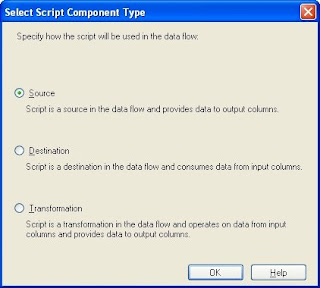
I added a script component to my data flow task. When asked if it was a Source, Transformation or a Destination, I selected Source.


I then added a total of 15 outputs. (14 for the result sets, 1 for the output parameter) To do this, I clicked on the Inputs and Outputs tab, and clicked on the Add Output button until I have 15 outputs.

Then came the fun part: adding, naming and typing all of the columns for all of the outputs. On the same Inputs and Outputs tab, I selected the first output, renamed it to the result set name. Then I opened up the output in the tree view, and expanded the Output Columns folder. I clicked on the Add Column button until I had as many columns as the first result set.
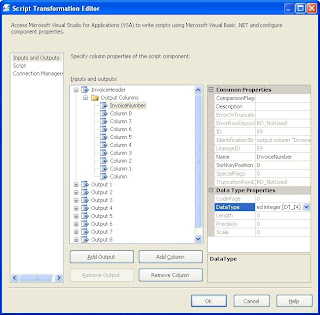


Once the columns where in the tree view, I selected the first one, changed the name, set the data type and size, and moved onto the next column, until they were complete.

Then I did the same for each output in the component.

The final step here is to configure the script component to use your newly created connection manager. To do this, click on the Connection tab and add a new connection. Set the name, and then in the middle column, choose your connection manager.
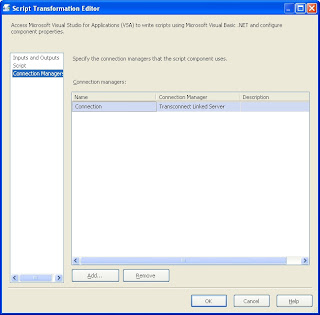


Scripting the Outputs
The next step is to tie together the stored procedure and the script component outputs. To do this, click on the script tab and click the Design Script button to open the scripting window.

I added 2 subroutines to handle opening the connection and executing the stored procedure:

Public Class ScriptMain
Inherits UserComponent

Private connMgr As IDTSConnectionManager90
Private Conn As SqlConnection
Private Cmd As SqlCommand
Private sqlReader As SqlDataReader


Public Overrides Sub AcquireConnections(ByVal Transaction As Object)

connMgr = Me.Connections.Connection ‘This is the connection to your connection manager.
Conn = CType(connMgr.AcquireConnection(Nothing), SqlConnection)

End Sub

Public Overrides Sub PreExecute()

Dim cmd As New SqlCommand("Declare @SessionID int; Exec spgTransactions @SessionID OUTPUT; Select @SessionID", Conn)
sqlReader = cmd.ExecuteReader

End Sub

The AcquireConnections subroutine is called by SSIS when it is ready to open the database connections. I override it to make sure the database connection is ready to use.

Likewise, the PreExecute is called when it’s time to get the data. (This should clear up some of the long running PreExecute issues out there.) I open our SQL Reader here and execute the source stored procedure.

Now comes the fun part. Linking the result sets to the output columns.

This is done in the CreateNewOutputRows subroutine:
Public Overrides Sub CreateNewOutputRows()

'Invoice Header
Do While sqlReader.Read
With Me.InvoiceHeaderBuffer
.AddRow()
.InvoiceNumber = sqlReader.GetInt32(0)
.InvoiceDate = sqlReader.GetDate(1)
'etc, etc, etc for all columns.
End With
Loop

sqlReader.NextResult()

'Invoice Detail
Do While sqlReader.Read
With Me.InvoiceDetailBuffer
.AddRow()
...

'more outputs and more columns
' until we get to the last result set which will be the output parameter (SessionID)

sqlReader.NextResult()

'Session ID
'We know this result set has only 1 row
sqlReader.Read
With Me.SessionIDBuffer
.AddRow()
.SessionID = sqlReader.GetInt32(0)
End With

sqlReader.Read 'Clear the read queue

End Sub

This code goes thru each result set in the SQL Reader and assigns the value of the result set to the output column. I did not show all of the columns or all of the outputs since it’s the same concept for each.

Once that is done, I clean up after myself:
Public Overrides Sub PostExecute()

sqlReader.Close()

End Sub

Public Overrides Sub ReleaseConnections()

connMgr.ReleaseConnection(Conn)

End Sub


This closes the SQL Reader and releases the connection to the database.

Once this is done, close the script window and click on OK on the script component properties.

The script component will now have multiple outputs that you can select from when linking it to another data flow component.

Conclusion
I hope this will help you when you need to return multiple result sets from stored procedures into SSIS. If you are familiar with VB.NET coding, you should pick this up easily, and even if not, the example at least gives you the basic steps and something to copy from.

peace

Friday, August 29, 2008

Hug a Developer...

This would be a lot funnier if it weren't so true...


What are your thoughts?

peace

Thursday, August 28, 2008

SSIS 2008 Sets Record

First of all, hello from the depths of an enterprise ETL project!

I haven't been working on reporting at all in the last few months, dedicated to ETL and optimization.

Second, I realize that this article is from February, but I thought it was a really good read.
http://blogs.msdn.com/sqlperf/archive/2008/02/27/etl-world-record.aspx

peace

Wednesday, May 28, 2008

Removing Recent Projects in .NET

I recently had a need to cleanup my "recent project list" in BIDS.

Since you cannot do this from the .NET UI, you will have to resort to messing with the registry.


*** Serious problems might occur if you modify the registry incorrectly!!! ***
*** Modify the registry at your own risk!!! ***


That being said... Open up RegEdt32 using the Run command from the start menu.
Navigate to:
HKEY_CURRENT_USER\Software\Microsoft\VisualStudio\8.0\ProjectMRUList

(for .NET 2003, use 7.1 instead of 8.0, for .NET 2002, use 7.0)

Then, from the right hand window, select the values that you do not want, and press delete. The value names are File1, File2, ...

Be aware that you will need to renumber these to be in order from 1 on...
If they are not in exact sequential order, they will not load on the start page. This is not documented on the Microsoft KB article (http://support.microsoft.com/kb/919486)

peace

Monday, March 31, 2008

View of 1999...From the 1960's

Here is another interesting view of the future from the mid 60's... again, they seem to have gotten the concepts correct, but not the implementation...

And they also didn't see the social norms changing. The wife does the shopping while the husband grimaces and pays for it!


From:
View of 1999 from the '60s


peace

BobP